The hub

IAS Dashboard

What’s happening?

The central brain of the IAS suite.

One view across operations, maintenance, downtime, assets, inventory, procurement, safety, finance, engineering and knowledge, with an AI you can ask in plain English.

The challenge

Stop rebuilding the picture every morning.

Leaders shouldn’t have to stitch together spreadsheets, separate systems and delayed reports before every meeting. Dashboard pulls every connected IAS product and approved company signal into one place and shows what needs attention first.

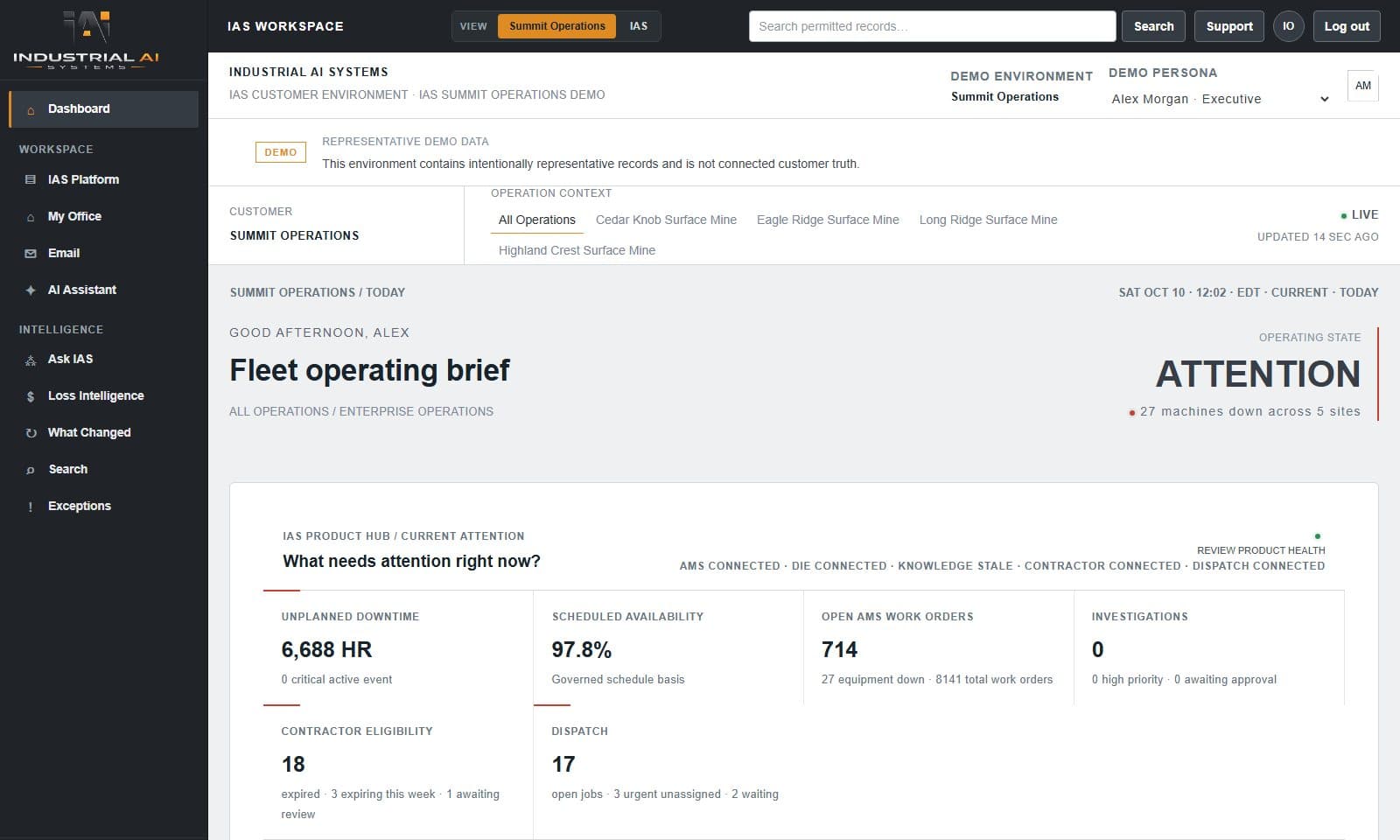
IAS Dashboard home showing what needs attention across connected products
Dashboard · What needs attention across every connected product · demonstration data

What Dashboard does

Features and reasons to buy.

See everything

  • Operations, maintenance, downtime, assets, inventory, procurement, safety, finance, engineering and knowledge in one place
  • A single ‘needs attention’ queue across every connected product
  • Drill from the company view down to a site, department or asset
  • Search across everything from one box

Ask IAS

  • Ask a question in plain English and get an answer built from live product data
  • Engineering and knowledge questions hand off to Downtime Intelligence or Knowledge Preservation with your question carried over
  • If the question is unclear, it asks ‘did you mean…?’ instead of guessing
  • Requests to take actions are declined, so nothing happens without a person

Find the patterns

  • Pattern discovery surfaces recurring problems across sources
  • Loss intelligence shows where time and money are going
  • A value view of what IAS is doing for the operation

Run the suite

  • One sign-in to every connected IAS product
  • User administration with role templates per product
  • Each product keeps its own data and reports into Dashboard

Who it’s for

Built for the people doing the work.

  • Site and operations managers
  • Executives and department owners
  • Maintenance and reliability leaders
  • Administrators

How it works

From the morning view to the responsible team

  1. 01Open Dashboard and see what needs attention
  2. 02Ask IAS a question in plain English
  3. 03Drill into the site, department or asset
  4. 04Jump straight into the connected product
  5. 05Assign follow-up to the right people

Trust and evidence

Built to be checked.

Answers are built from the data the connected products already hold. Numbers come from the records, not from the AI, and every view keeps its source and refresh time.

  • Runs on your hardware, inside your network
  • No token or per-question charges
  • Role-based access and audit trail
Review IAS security →

Works with

Better connected.

Every IAS product

Contractor, Dispatch, Asset Management, Inventory, Downtime Intelligence, Knowledge Preservation and OMS all report into Dashboard.

Your existing systems

Approved company signals can be brought in without replacing the systems that create them.

Illustrative example · no customer data shown

Morning operating review

An operations manager opens Dashboard, sees three items needing attention across maintenance, inventory and contractors, asks IAS which asset caused the most downtime this month, and jumps straight into Downtime Intelligence to see why.

Questions buyers ask

Does Dashboard replace our other systems?

No. It brings approved information together while the systems that create the records stay authoritative.

Do we need every IAS product?

No. Dashboard works with whichever IAS products you run and grows as you add more.

Where does it run?

On your own server, inside your network, with the AI running locally too. IAS doesn’t host your data.

Talk with IAS

Discuss a Dashboard implementation

IAS will walk your team through Dashboard, your information sources, users and infrastructure, and recommend a practical starting scope.