Operations & records

IAS Contractor

Who’s qualified to do this work?

Can this company and this person do this work, here, right now?

Company and worker qualifications, documents and expirations, checked against your own rules, with an instant answer and the reason behind it.

The challenge

‘Are they cleared?’ shouldn’t take a phone call and a spreadsheet.

Licenses expire, orientations lapse, insurance runs out, and nobody notices until someone is already on site. Contractor keeps every qualification current and answers the eligibility question instantly, with the reason.

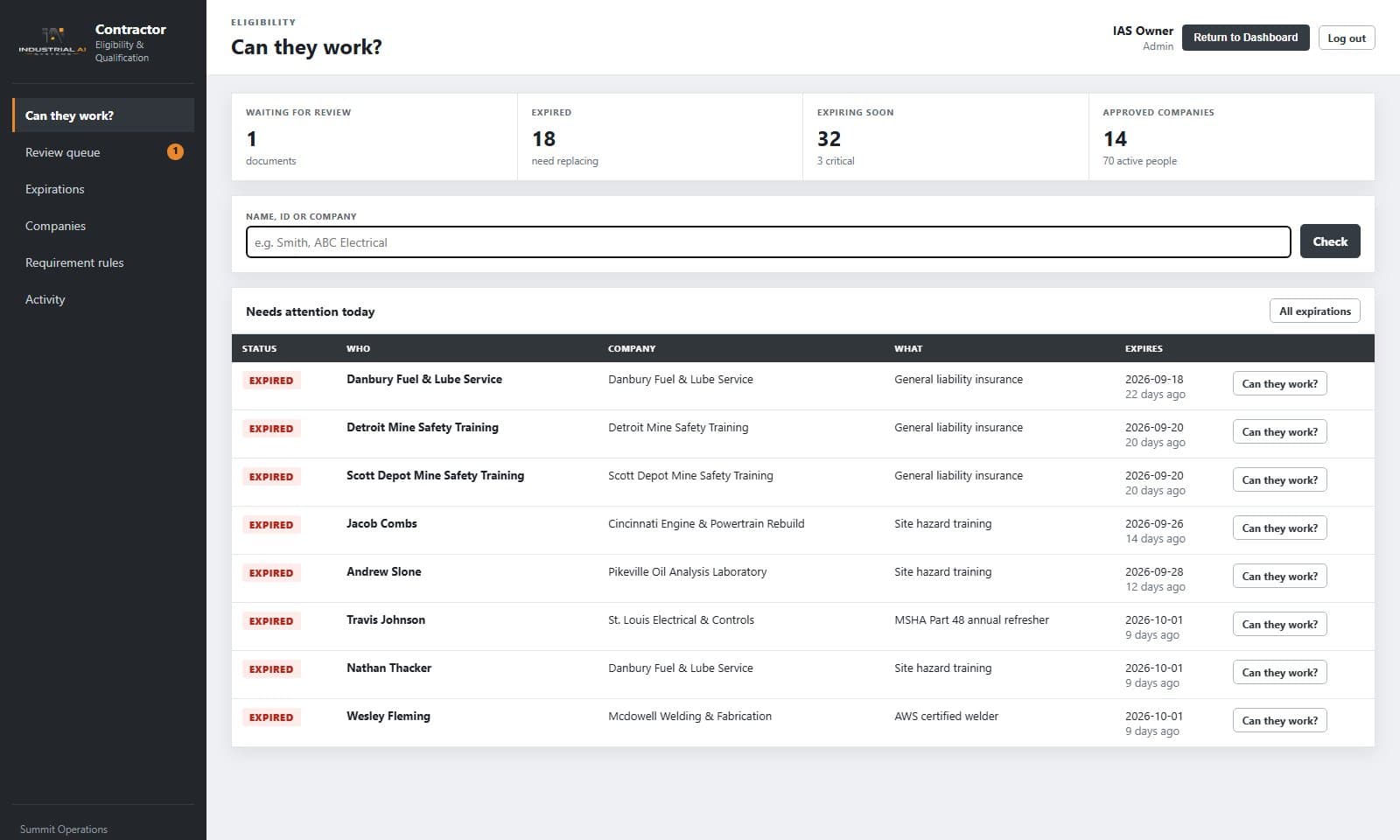
Contractor eligibility home with expired and expiring qualifications
Contractor · “Can they work?”: expirations and eligibility at a glance · demonstration data

What Contractor does

Features and reasons to buy.

Companies and people

  • Company records with contacts, work types, documents and insurance
  • Individual worker profiles under each company
  • Companies and people are approved separately

Qualifications

  • Certifications, licenses, training, orientations and insurance
  • Issue and expiry dates with the document attached
  • Review queue: nothing is official until a person reviews it

Eligibility

  • Your rules: what each type of work needs at each location
  • Instant answer: eligible, not eligible (with the reason), pending, conditional or overridden
  • ‘Can they work today?’ lookup by name or company
  • Every decision saved with its evidence, so it can be reconstructed later

Expirations and audit

  • Expiry warnings, with eligibility removed automatically when something lapses
  • Check a future date: ‘will they still be eligible on Tuesday?’
  • Full audit trail of uploads, reviews and approvals

Fits what you have

  • Designed to sit alongside your existing gate and access systems, not replace them
  • Works on its own, or connected to Dispatch and Dashboard

Who it’s for

Built for the people doing the work.

  • Contractor coordinators
  • Safety and compliance staff
  • Site managers
  • Dispatchers

How it works

From paperwork to a clear yes or no

  1. 01Add companies and workers
  2. 02Collect and review documents
  3. 03Set the rules for each type of work and location
  4. 04Check eligibility instantly
  5. 05Get warned before anything expires

Trust and evidence

Built to be checked.

Every eligibility decision is saved with the rule version and the evidence used. Overrides require a reason, an approver and an expiry.

  • Runs on your hardware, inside your network
  • No token or per-question charges
  • Role-based access and audit trail
Review IAS security →

Works with

Better connected.

Dispatch

Nobody gets recommended for a job they aren’t eligible for.

Dashboard

Expirations and eligibility issues in the central view.

Illustrative example · no customer data shown

Electrical work at Site A

A coordinator checks whether a contractor electrician can start today. Contractor answers ‘not eligible: Site A orientation expired last week’, and the electrician is scheduled for orientation before anyone is sent out.

Questions buyers ask

Does it replace our gate or badge system?

No. It works alongside existing access systems.

Can we check eligibility for a future date?

Yes. Check any date to see whether someone will still be eligible.

Is it only for heavy industry?

No. Any organization that brings in outside companies or workers can use it.

Talk with IAS

Discuss Contractor

IAS will walk your team through Contractor, your information sources, users and infrastructure, and recommend a practical starting scope.